
Losing a smartphone or falling victim to device theft is one of the most frustrating, stressful experiences of modern life. Today’s smartphones contain far more than personal photos and contact lists; they store mobile banking credentials, digital wallet cards, password managers, sensitive emails, and private messages.
To help users track, secure, and recover missing hardware, Apple built a powerful security ecosystem known as the Find My network. Featuring advanced tools like Find My iPhone and Offline Finding (Find My Network), this built-in protection system ensures that your device—alongside attached AirTags and compatible Apple accessories—can be tracked on a map even when disconnected from active Wi-Fi or cellular networks. Setting up these features correctly before an emergency occurs is one of the most critical steps in smartphone ownership. Here is a comprehensive guide to understanding Find My iPhone, activating offline tracking, safeguarding your financial data, and executing remote security measures if your phone goes missing.
How Apple’s Find My and Offline Finding Technology Works
Understanding how the Find My network operates behind the scenes helps highlight why toggling these settings on is essential for privacy and security.
1. Standard Find My iPhone Tracking
When your iPhone is powered on and connected to a Wi-Fi network or cellular data plan, Find My uses integrated GPS receivers, nearby Wi-Fi routers, and cellular tower signals to pinpoint the device’s precise geographical location. Owners can view their device on an interactive map using iCloud.com or another Apple device signed into the same Apple ID.
2. The Power of Offline Finding (Find My Network)
Historically, if a lost iPhone was turned off, put into Airplane Mode, or lost cellular connectivity, location tracking stopped instantly. To solve this, Apple introduced Offline Finding (the crowdsourced Find My Network):
-
Bluetooth Beacon Transmissions: Even when an iPhone lacks Wi-Fi or cellular data—or is powered off—it emits secure, end-to-end encrypted Bluetooth signals.
-
Crowdsourced Mesh Network: Nearby Apple devices (iPhones, iPads, and MacBooks owned by strangers passing by) detect these Bluetooth signals completely in the background.
-
Encrypted Relay: The surrounding devices securely relay the lost iPhone’s location coordinates directly to Apple’s iCloud servers.
-
Zero Privacy Compromise: Neither Apple nor the owners of the relaying devices can view your phone’s location or data. The entire transmission is encrypted with unique rotating keys that only the owner’s primary Apple ID can decrypt.
Step-by-Step Guide: How to Enable Find My and Offline Finding on iPhone
To ensure your iPhone, Apple Watch, AirPods, and attached AirTags remain trackable at all times, verify your settings using these simple steps:
-
Open Settings: Tap the Settings app on your iPhone home screen.
-
Access Your Apple ID: Tap your name at the top of the Settings menu.
-
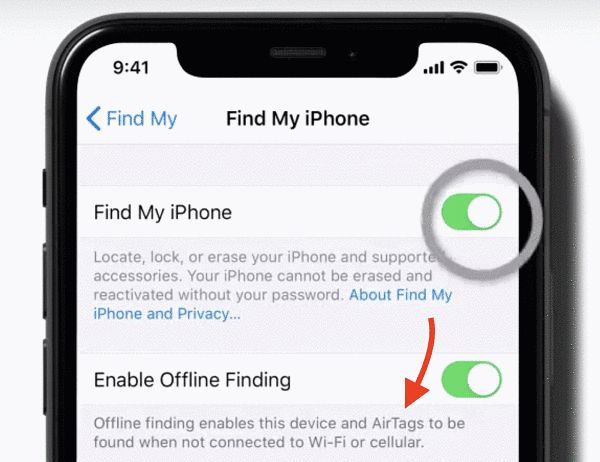
Select Find My: Tap Find My, then select Find My iPhone at the top of the menu.
-
Toggle On Find My iPhone: Ensure the main Find My iPhone switch is toggled ON (green). This enables Activation Lock, requiring your Apple ID password before anyone can erase or reactivate the device.
-
Enable Find My Network (Offline Finding): Toggle ON Find My Network (or Enable Offline Finding). This permits offline location tracking via surrounding Apple devices.
-
Enable Send Last Location: Toggle ON Send Last Location. This automatically transmits your iPhone’s location to Apple when the battery drops to critically low levels, right before the phone shuts down.
Financial Protections: Safeguarding Mobile Banking, Investments, and Identity
Losing a smartphone poses immediate financial risks if unauthorized individuals gain access to digital banking applications, credit cards, or identity documentation.
1. Activation Lock and Stolen Device Protection
When Find My iPhone is activated, Activation Lock turns on automatically:
-
Preventing Unauthorized Resale: Activation Lock links your device permanently to your Apple ID on Apple’s activation servers. Even if a thief performs a hardware factory reset, the device cannot be set up or used without your password.
-
Stolen Device Protection: iOS includes enhanced security layers requiring Face ID or Touch ID authentication—alongside timed security delays—for changing critical account security settings away from familiar locations (like home or work).
2. Protecting Digital Banking and Personal Finance Apps
-
Remote Data Erasure: If your phone is stolen, accessing Find My allows you to send a remote Erase iPhone command. This wipes all personal data, banking apps, stored documents, and credentials clean immediately.
-
Disabling Apple Pay Remotely: Erasing or putting a device into Lost Mode suspends all credit, debit, and transit cards linked to Apple Pay automatically, preventing unauthorized transactions.
-
Securing Investments and Credit: Protecting financial apps ensures unapproved access cannot compromise personal finance accounts, stock investment portfolios, home mortgage management platforms, or retirement savings.
Legal Services, Insurance Coverage, and Consumer Rights
Navigating a lost or stolen smartphone involves practical legal and insurance protections to minimize unexpected financial loss.
1. Managing Auto, Home, and Theft Insurance Claims
-
AppleCare+ with Theft and Loss: If you hold AppleCare+ with Theft and Loss, you can file an insurance claim for a replacement device. Crucial Requirement: Apple requires Find My iPhone to remain enabled on your lost device throughout the entire claim process. Disabling Find My prematurely invalidates theft insurance claims!
-
Homeowners and Renters Insurance: Standard homeowners or renters insurance policies often cover personal property stolen outside the home, including expensive electronics, subject to policy deductibles.
2. Identity Theft Protections and Legal Rights
-
Reporting to Authorities: Obtaining a formal police report provides legal documentation if stolen devices are used in fraudulent activity or identity theft schemes.
-
Engaging Professional Legal Services: If device theft leads to severe financial fraud or identity compromise, consulting qualified legal services or an identity theft attorney protects your credit history and legal standing.
Healthcare and Personal Safety During Device Loss
Smartphones play an increasingly central role in personal health tracking, emergency medical contact systems, and daily wellness management.
-
Medical ID Access: Setting up your Medical ID in the Health app allows emergency first responders to view essential health conditions, blood type, allergies, and emergency contact details directly from the lock screen without unlocking the phone.
-
Health and Medical Insurance Records: Securing your device prevents unauthorized access to digital health and primary medical insurance cards or telehealth apps stored on your device.
-
Family Peace of Mind: Utilizing family sharing within Find My allows trusted loved ones to locate your device during travel emergencies or physical safety situations.
Fascinating Facts About Smartphone Security and Tracking
-
Billions of Devices: The Apple Find My network leverages hundreds of millions of active Apple devices globally to locate lost hardware, creating one of the largest decentralized crowdsourced networks in human history.
-
Ultra-Wideband Precision: Modern iPhones and AirTags utilize Ultra-Wideband (UWB) technology, offering “Precision Finding” that guides users with on-screen directional arrows down to the exact inch inside a room.
-
Power Reserves for Tracking: Modern iPhones reserve a tiny percentage of battery power purely for Bluetooth beaconing, allowing offline tracking to function for hours even after the main screen displays a “dead battery” icon.
-
Activation Lock Drop in Theft: The introduction of Activation Lock on iOS led to a dramatic, measurable drop in smartphone street thefts in major metropolitan cities worldwide because stolen devices became unusable paperweights.
Practical Action Steps If Your iPhone Is Lost or Stolen
If you cannot find your iPhone, act quickly by following this emergency recovery protocol:
-
Access Find My Immediately: Log into iCloud.com/find on a computer browser or open the Find My app on a friend or family member’s Apple device.
-
Play a Sound: If the device is nearby, send a remote command to play a loud chime, even if the phone is set to silent or vibrate mode.
-
Enable Lost Mode: Turn on Lost Mode to lock your screen with a custom passcode, display a phone number and message on the lock screen for anyone who finds it, and suspend Apple Pay.
-
Report to Your Carrier: Contact your mobile network provider to suspend your cellular line, preventing unauthorized calls, text messages, or two-factor authentication SMS codes.
-
Do Not Remove Device from Account: Never click “Remove from Account” in iCloud unless you have received a replacement device or sold the phone. Removing the device disables Activation Lock, giving thieves full access to reuse or resell your hardware!
Final Thoughts
The Find My ecosystem and Offline Finding feature represent remarkable advancements in device security, data privacy, and hardware recovery. By taking two minutes today to ensure Find My iPhone, Find My Network, and Send Last Location are fully activated in your settings menu, you protect far more than an expensive piece of technology—you secure your personal identity, financial accounts, and peace of mind.
Frequently Asked Questions (FAQ)
What does “Enable Offline Finding” or “Find My Network” actually do?
Find My Network uses encrypted background Bluetooth signals from surrounding Apple devices owned by others to locate your lost iPhone on a map, even if your phone is turned off, out of battery, or disconnected from Wi-Fi and cellular data.
Can Find My iPhone track a phone that is completely powered off?
Yes! On modern iPhone models running updated iOS software, the Find My Network continues to transmit secure low-energy Bluetooth signals for up to 24 hours after the phone has been powered off or the battery has drained.
Why shouldn’t I remove a stolen iPhone from my Apple ID account?
Removing a lost or stolen iPhone from your Apple ID account turns off Activation Lock completely. This allows a thief to re-activate, use, or resell your stolen phone without needing your password.
Does turning on Find My drain your iPhone battery?
No. Find My and Offline Finding utilize low-power Bluetooth protocols and background location services that have a negligible, virtually imperceptible impact on daily battery life.
